

A Checklist for Building an Optimized Website for Search and AI Engines

building optimized website for ai seo

Planning to build a new website?
There are a few things you should take into consideration before you start thinking about the logo, colors, or the content you’ll display.

You probably familiar with the SEO holy trinity of on-page, off-page and technical SEO. There’s a reason why technology is at the top of the triangle.
The reason is simple:
Even if you have perfect content and everyone in the world talks about it non-stop, including relevant links, it won’t help you if your website isn’t built correctly from a technological standpoint.

Your site’s infrastructure is everything. Without it, search engine and AI bots might not reach your site, and therefore, it won’t be indexed in Google and will not get into Gemini, ChatGPT, Claude and Perplexity answers.

So, what is important to remember before starting to build a website?

Choose the Right Platform for Your Website

WordPress remains one of our favorite platforms for SEO. It gives SEO teams enormous flexibility over content, page structure, templates, metadata, internal links, schema, and pretty much everything else we like playing with.

Webflow, Wix, Shopify, and other platforms can all support SEO when configured correctly. And now we have an entirely new category to consider: websites built with AI coding tools and platforms such as Claude Code, Lovable, Base44, and whatever new one probably launched while we were writing this paragraph.

The important question you need to ask yourself before building your website is: “Can this setup give us control over everything search engines, AI systems, and users need?”

That includes crawlability, indexability, URLs, metadata, canonicals, redirects, structured data, XML sitemaps, internal linking, performance, mobile usability, and the ability to easily create and update content.

Whatever you build with, don’t sacrifice that control for a pretty homepage.

Keep Your Work Environment Out of Search

Even if you haven’t told anyone that you’re building a new website, Google and AI bots might find it.

A link from your hosting provider, an old domain, or an accidental external link may be enough to expose your unfinished masterpiece to search engines.

We don’t want that.
Whenever possible, build your website in a private or password-protected staging environment.

A robots.txt directive such as:

User-agent: *
Disallow: /
can tell compliant crawlers not to crawl the site, but robots.txt should not be treated as a security mechanism or a guaranteed way to prevent indexing.

And whatever method you choose, put this somewhere on your launch checklist in very large letters:

REMOVE THE BLOCKING BEFORE GOING LIVE.

You’d be surprised. 🙂

Yoast It Up

If you’re using WordPress, Yoast is still one of the first plugins we’d recommend considering.

Yoast gives you convenient control over many of the technical elements you’ll need, including title tags, meta descriptions, canonical URLs, robots directives, XML sitemaps, breadcrumbs, and structured data.

Other SEO plugins can do similar things, so Yoast isn’t mandatory. The important thing is making sure someone has control over these elements.

Keep Images Light, but Make Them Worth Seeing

Keep images under 100KB whenever possible, but don’t sacrifice quality just to hit a number.

Resize images to the dimensions in which they’ll actually be displayed, compress them, use modern formats such as WebP or AVIF where appropriate, and use responsive images and lazy loading when relevant. There is no reason to upload a massive 2000×2000 image if it’s going to appear as a tiny thumbnail.

But performance is only half the story.

Images are searchable content.

Google and AI systems are becoming increasingly visual, which means the images on your website can contribute to how your brand, products, and content are discovered and understood.

Give images descriptive filenames and useful alt text, place them alongside relevant textual content, and whenever possible, use original visuals rather than the same stock images appearing across hundreds of websites.

Google’s Image Collections also make it possible for users to save images, organize them into collections, and discover related visual content. We explore why this matters for brands in AI Is Watching Your Images.

And think about your visual identity, too.

If someone encounters your image outside your website, can they still tell it belongs to your brand?

Less is More

Every script, animation, tracking pixel, plugin, widget, chatbot, slider, video background, and very-important-thing-that-marketing-absolutely-must-have comes with a cost.

That doesn’t mean don’t use JavaScript or don’t use video, and it certainly doesn’t mean your website has to look like it was built in 1998.

It means make every element earn its place.

Keep an eye on unnecessary JavaScript, third-party scripts, oversized assets, render-blocking resources, and plugins you installed three years ago and forgot existed.

Performance still matters.

HTTPS

Security has long been an integral part of the basic requirements of any site, regardless of search engines, AI and SEO.

Your entire website should run over HTTPS, HTTP versions should redirect correctly, and there should be no mixed-content issues.

https

Mobile First

Your website needs to work properly on mobile.

Check navigation, font sizes, buttons, forms, tables, images, videos, popups, sticky elements, and page speed on a real phone.

Also make sure that important content isn’t accidentally missing from the mobile version.

The goal isn’t merely to make Google or ChatGPT happy. It’s to avoid making the person standing in line at the supermarket trying to read your website unhappy.

Plan Your Site Hierarchy Before You Design It

Hierarchical Planning

Here’s where website planning becomes much more interesting in the AI era.
Before designing anything, map the information your website needs to communicate.

For a company website, that might include:
About us
Products
Solutions
Sevices
Articles
Videos & Webinars
Industries
Integrations

Your site architecture should create relationship between these areas while translating your target audience different funnels.

Most important pages should be easy and quick to reach, preferably in one click.

This helps search and AI bots understand the importance of your site’s content, and is quite crucial for all visitors to your site – human and bots.

User and Bot Navigation

Navigation is still extremely important, but forget arbitrary rules such as “Every page must be accessible within three clicks”.

Instead, ask whether your navigation helps people understand where they are, what else exists, and where they should go next.

Your main navigation should emphasize the areas most important to your users and business without overwhelming visitors with every URL on the website.

Dropdown menus are absolutely fine. Mega menus are fine too.

The question is whether they create clarity or chaos.

Group related items logically, use labels people actually understand, prioritize the most important destinations, and avoid forcing users to scan a wall of 40 equally important links.

Then support navigation with:

  • Breadcrumbs
  • Contextual internal links
  • Related content
  • Category/hub pages
  • A useful footer
  • XML sitemaps for search engines

Which brings us to the footer.

Example of a Good Site's Structure

A good example of a website that manages to organize a huge amount of information without making the visitor feel completely lost is HubSpot. Its main navigation is organized around a few clear paths: Products, Solutions, Pricing, and Resources, rather than trying to squeeze every important page into the top navigation.


The mega menus then add the next level of context.
Products are organized by product type, while Solutions lets visitors navigate according to use case and company size, with further groupings around Marketing, Sales, Customer Service, Content, and AI. In other words, the structure reflects both what HubSpot sells and what its different audiences are trying to accomplish.


The homepage follows the same logic. It starts by explaining what HubSpot is and who it is for, followed immediately by strong trust signals, including its customer count and recognizable customer logos. 

From there, the page breaks the platform into understandable concepts such as CRM, connected products, and AI, rather than throwing every individual feature at the visitor at once. Calls to action such as Get a demo and Get started free are also repeated throughout the journey. 

The result is a useful example of what good website hierarchy should accomplish: give visitors a simple starting point, progressively reveal more detailed information, connect products with problems and audiences, and provide clear paths to the next relevant page. 

Search engines and AI systems benefit from many of those same relationships because the architecture makes it much clearer how the company’s products, solutions, audiences, and topics fit together.

Using Structured Data

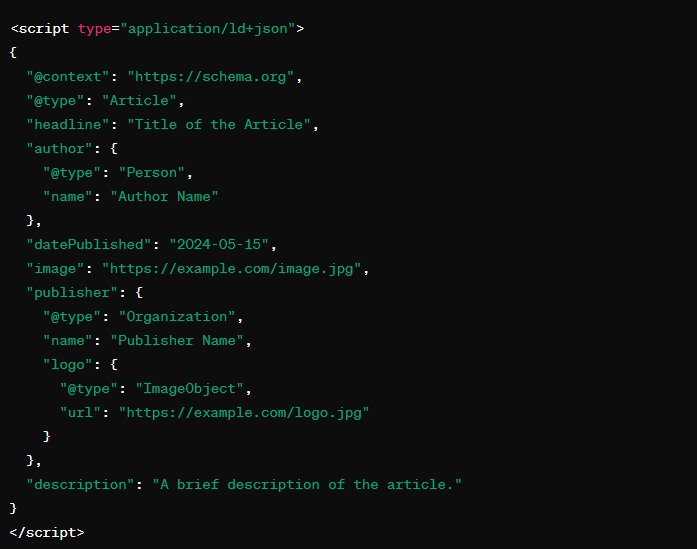
One way to improve the readability of a site is to mark its pages with structured data according to their functionality. For example, an article page can be defined as such using the following code:

structured data example

It should be noted that the Yoast plugin allows for the setting of structured data for various functions, from defining the type of page (web page/article/FAQ page) to providing ratings for a product or service, such as through star ratings.

Important Schemas you should implement:


Analysis and Tracking Tools (Google Analytics + Search Console)

Lastly, create an account with Google Analytics and Search Console so you can track your site’s progress in search engines and gather information on what is happening on your site. To open a Google Analytics account, you must have a Google email (Gmail).


more rocking content